How to Register for the FCCCM 2-Year Course (2027-28 Batch)
Please follow the steps below in order. It takes three short parts: create an account, become a College life member, and register for the course.
Keep these ready before you begin
What every candidate pays
| Fee | Amount (₹) |
|---|---|
| Life membership of the College (one-time; existing life members are exempt) | 5,500 |
| FCCCM course registration (24 months). Includes online lectures, 2-year access to the CCEF Knowledge Hub, quarterly online theory exams and the online OSCE at the end of year 1 | 70,000 |
| Exit examination (end of year 2), to be paid at least 90 days before the date of the theory exam | 25,000 |
GST is charged extra as per government regulations.
Extra charges you can avoid
Register by 15 December 2026. Registrations from 16 to 31 December 2026 carry a ₹10,000 late fee. In the same way, if the exit examination fee is paid late, a ₹10,000 late fee is added. If a candidate does not pass and appears again, a re-examination fee of ₹25,000 is charged for each attempt. GST is extra on all of these.
Also plan for these (registered and paid separately)
The programme includes two in-person orientation programmes and a crash course at the end of year 2. A second crash course may also be held at the end of year 1. Each lasts 3 to 4 days and costs about ₹20,000. These are registered for and paid for separately from the course registration, and travel and stay are not included. Dates and registration links will be shared with enrolled candidates. Any change in fees is communicated at least 90 days before the orientation, crash course or examination.
Create your account
Visit the website and create your account
Go to icueducation.com/users/login.
If you do not have an account, click Register (marked 3 in the picture) and create a new account.
You will receive an email on the address you gave. The link in it lets you set your password.
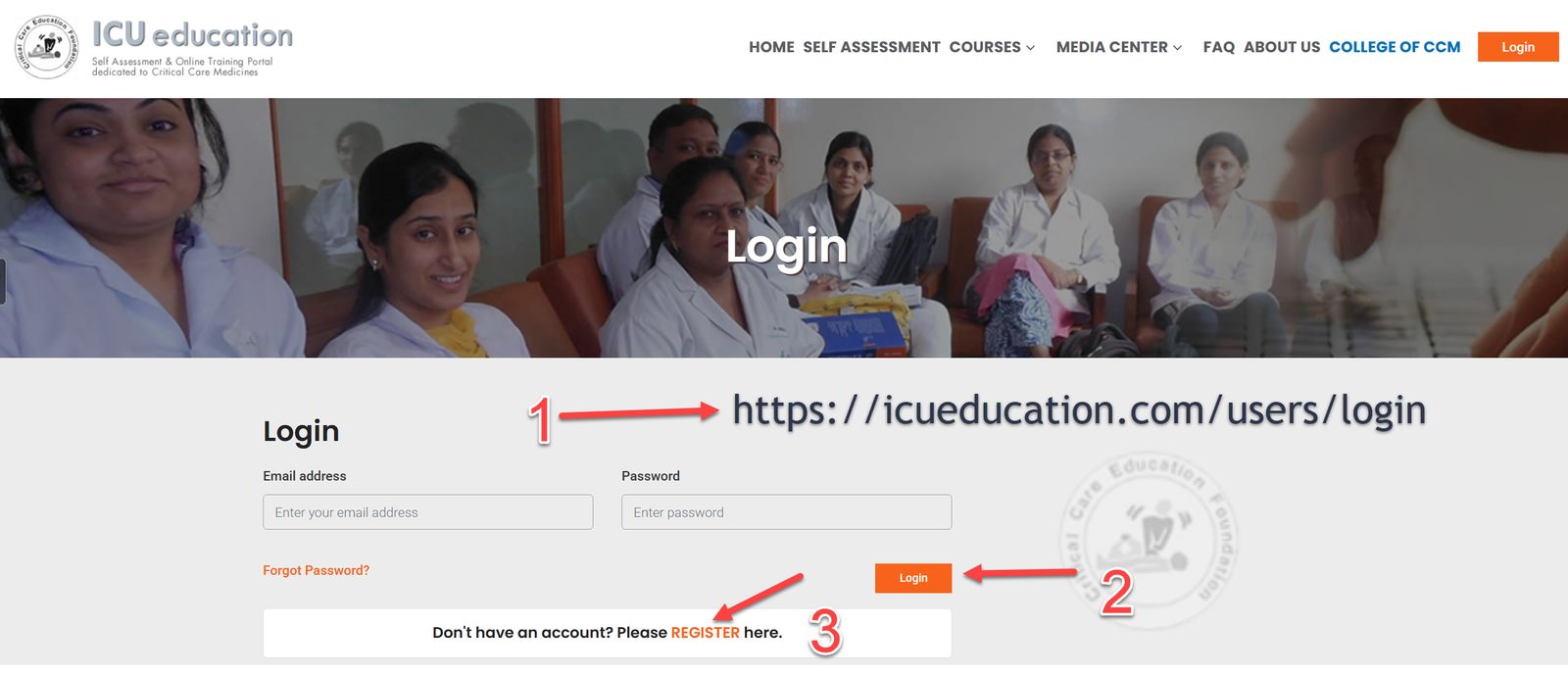
Log in
Use the account details you have just created to log in.
Become a College life member
Open your dashboard
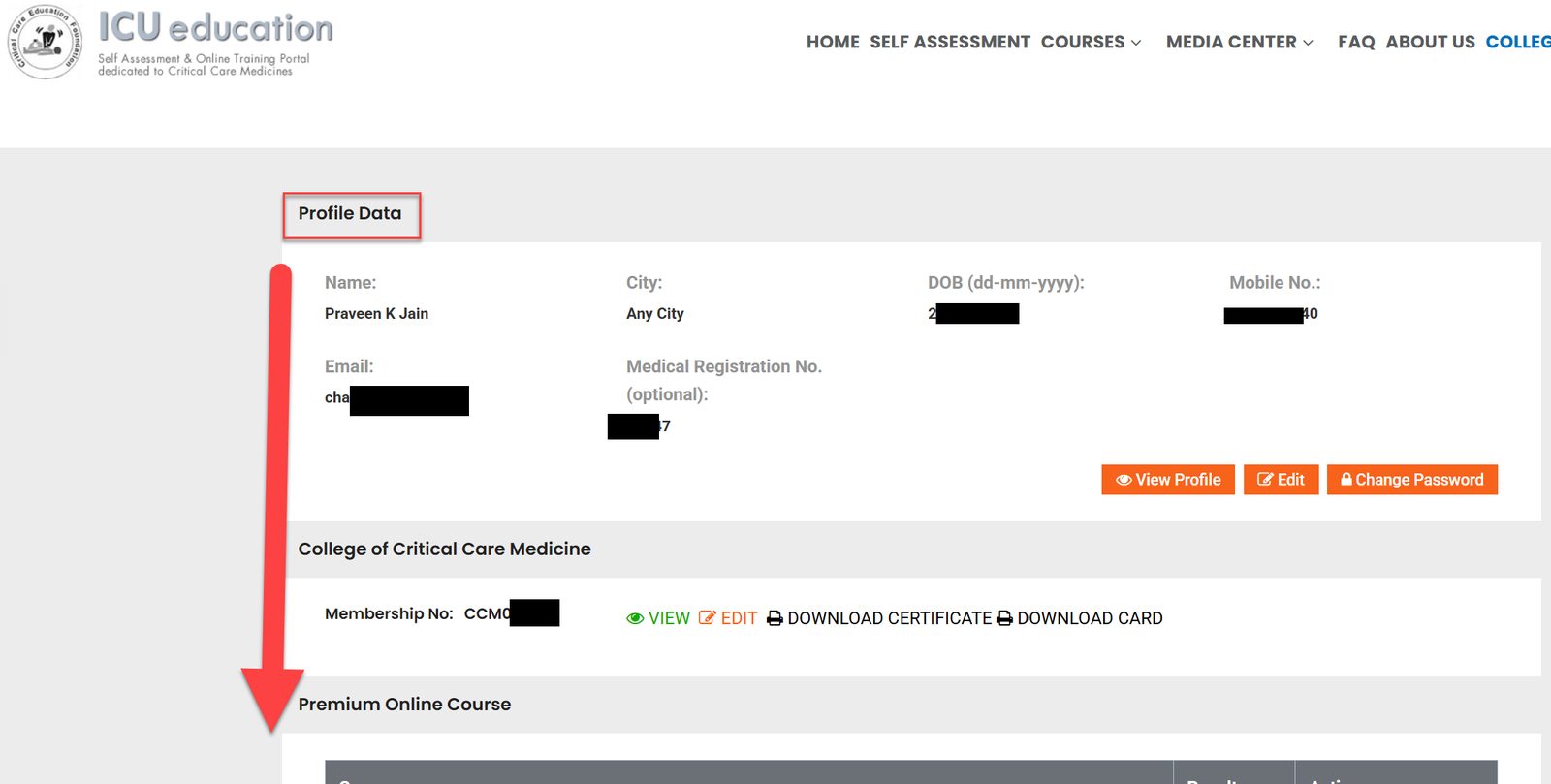
You are now on the dashboard. Your profile details are at the top.
Scroll down until you reach the membership section.
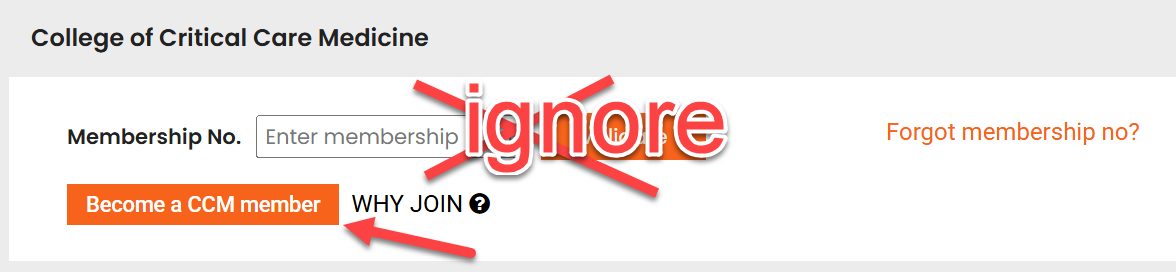
Click “Become a CCM member”
If you are a member, your membership number is displayed. If it is blank, you are not yet a member, so click “Become a CCM member”. This is a one-time life membership.
Ignore the “Enter membership” box.
Fill in the membership form
Fill in every space and answer every question.
The title “Doctor” is already there, so do not type it with your first name.
Put your first name and middle name together in the First Name row, and only your surname in the Last Name row.
Click “Save”.
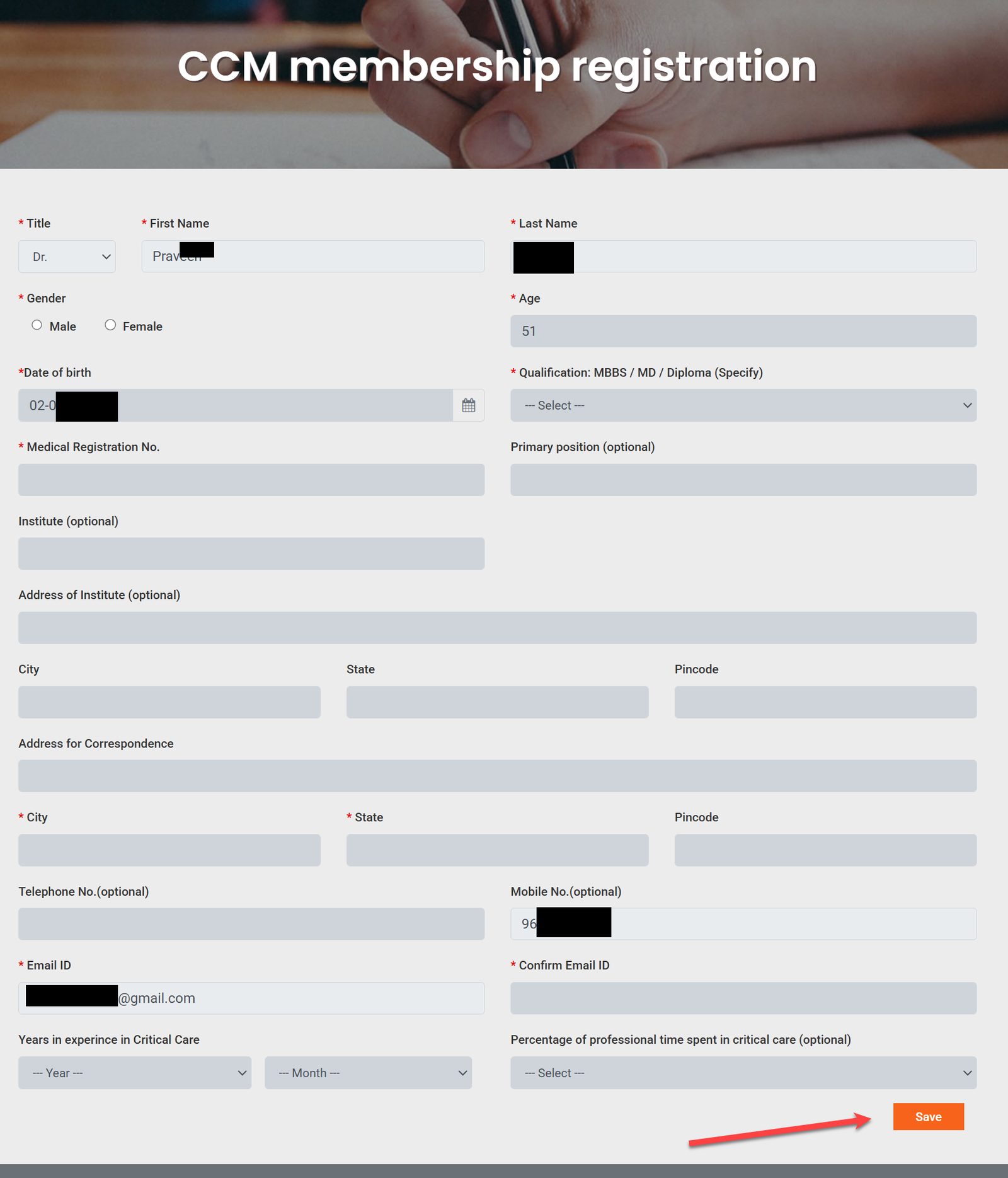
Pay the membership fee
You now reach the payment page. Fill in any blank details and click “Proceed”.
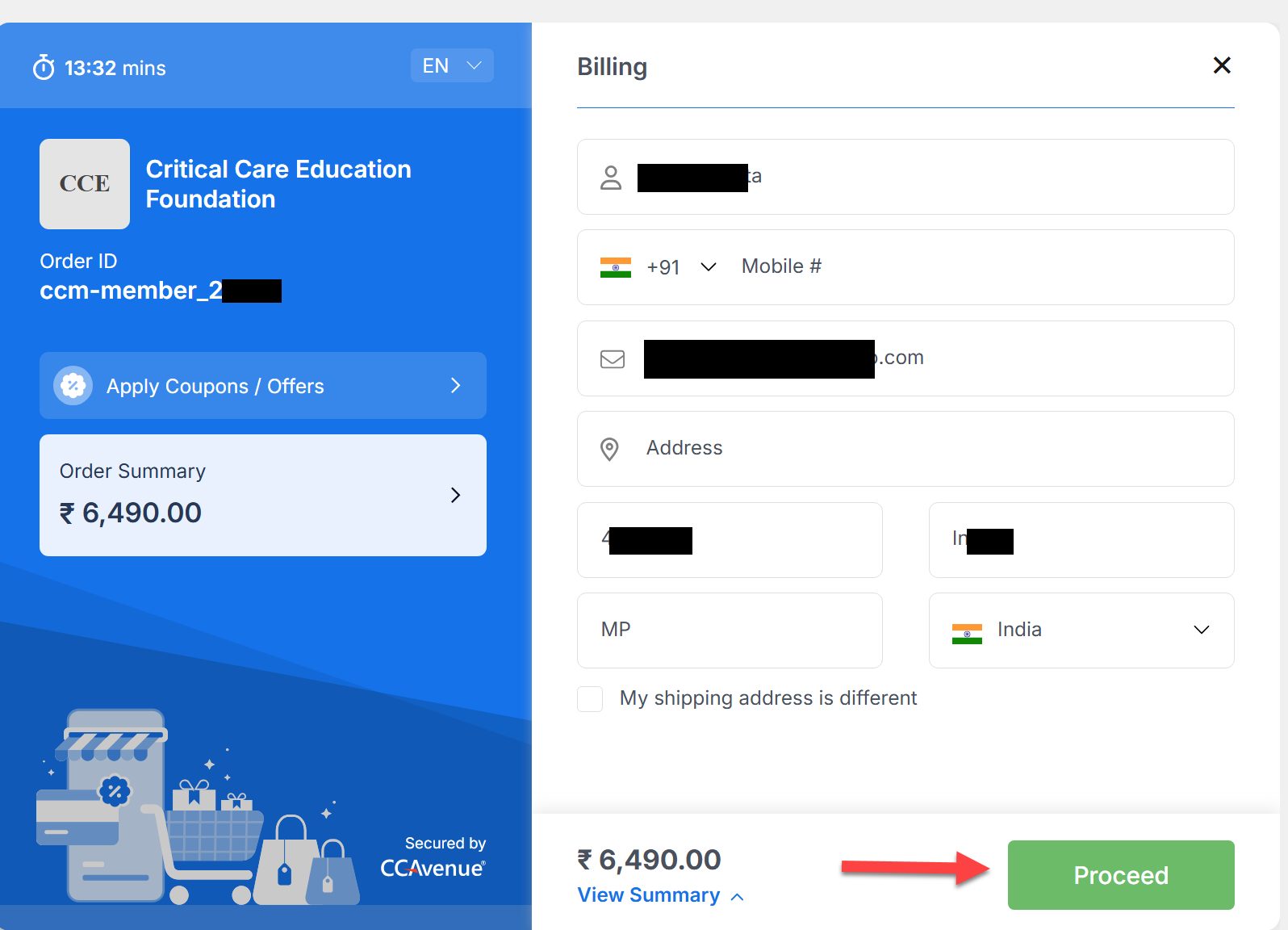
Download your certificate and card
Go back to icueducation.com and refresh the page. You will now see your membership number, with options to View, Edit and download the Certificate and the Card.
Click “View” to see your certificate, then download it. Download your membership card too.

Register for the FCCCM course
Find the course and click “Register”
Go back to the dashboard on icueducation.com and scroll down to the exam section. You will see the FCCCM 2-year course for 2027-28.
Click the orange “Register” button.

Fill in the registration form
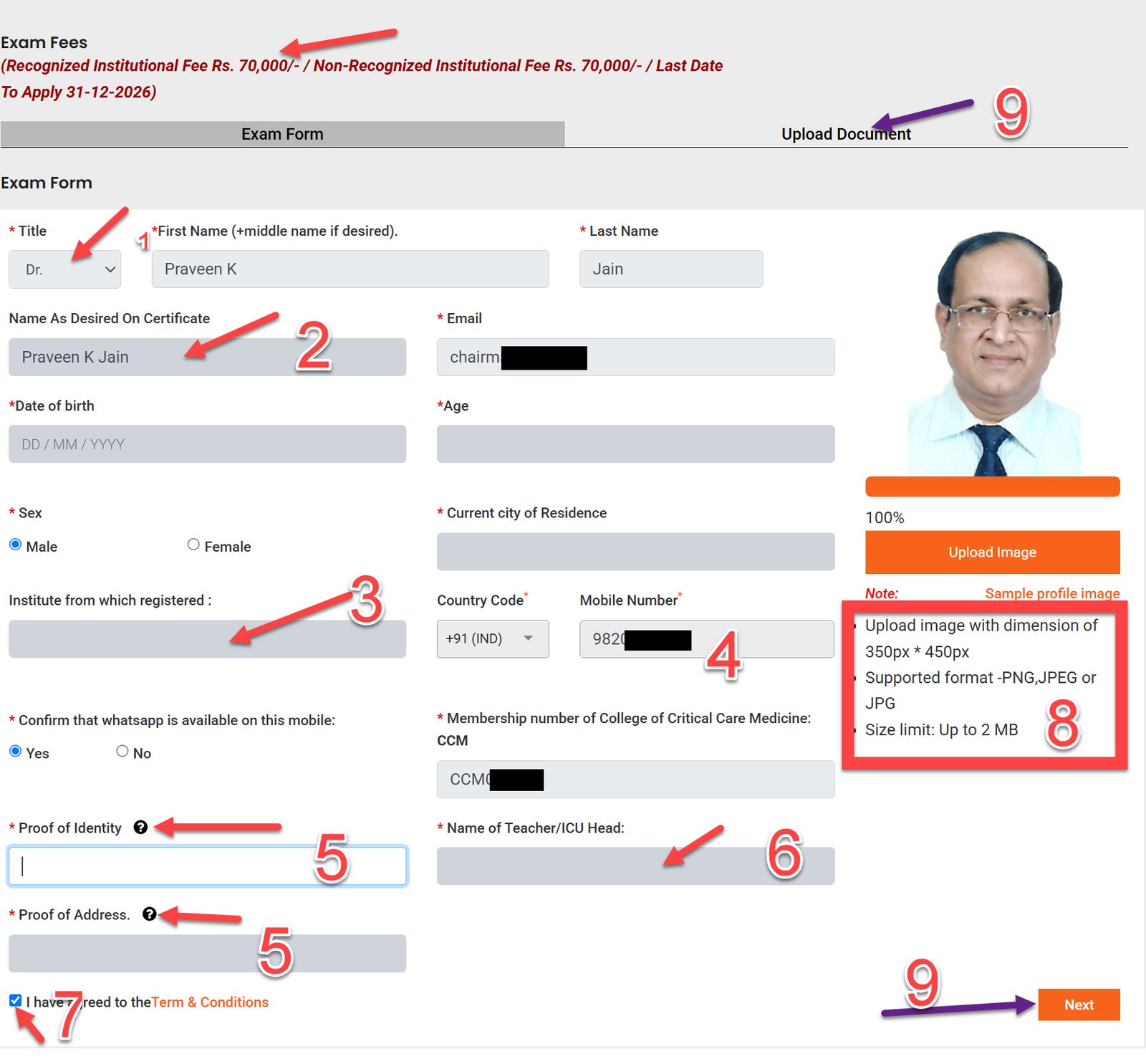
At the top of the form you will see the fee and the last date to apply. Fill in every blank row with accurate details.
“Dr” is already there, so do not add it to your first name. Check that your name appears exactly as you want it on your certificate.
Give the institute where you will work during the 2 years of the course.
Your mobile number is very important. Please give the one on which WhatsApp is active.
Click the “?” button to see which documents are accepted as proof of identity (Passport, Aadhaar card, Voter ID, Driving licence) and proof of address (electricity, water or mobile bill, bank statement, Voter ID, Driving licence, Aadhaar card).
Teacher: if the head of your Critical Care department is willing to be your teacher, ask them to fill the simple teacher registration form at the top right of collegeofcriticalcare.org so they can be approved. If you head the ICU yourself, put your own name.
Tick point 7: “I have read the terms and conditions”.
Photo: add the photo as described below.
When all this is done, click “Next” at the bottom, or “Upload Documents” at the top.
- A close-up photo of your face, with the face covering about 80% of the photo and both ears visible.
- Light background, and no stethoscope around the neck.
- Exactly 350 px wide × 450 px high. Many free websites will resize a photo for you: enter width 350 and height 450.
- JPEG or PNG format, file size up to 2 MB.
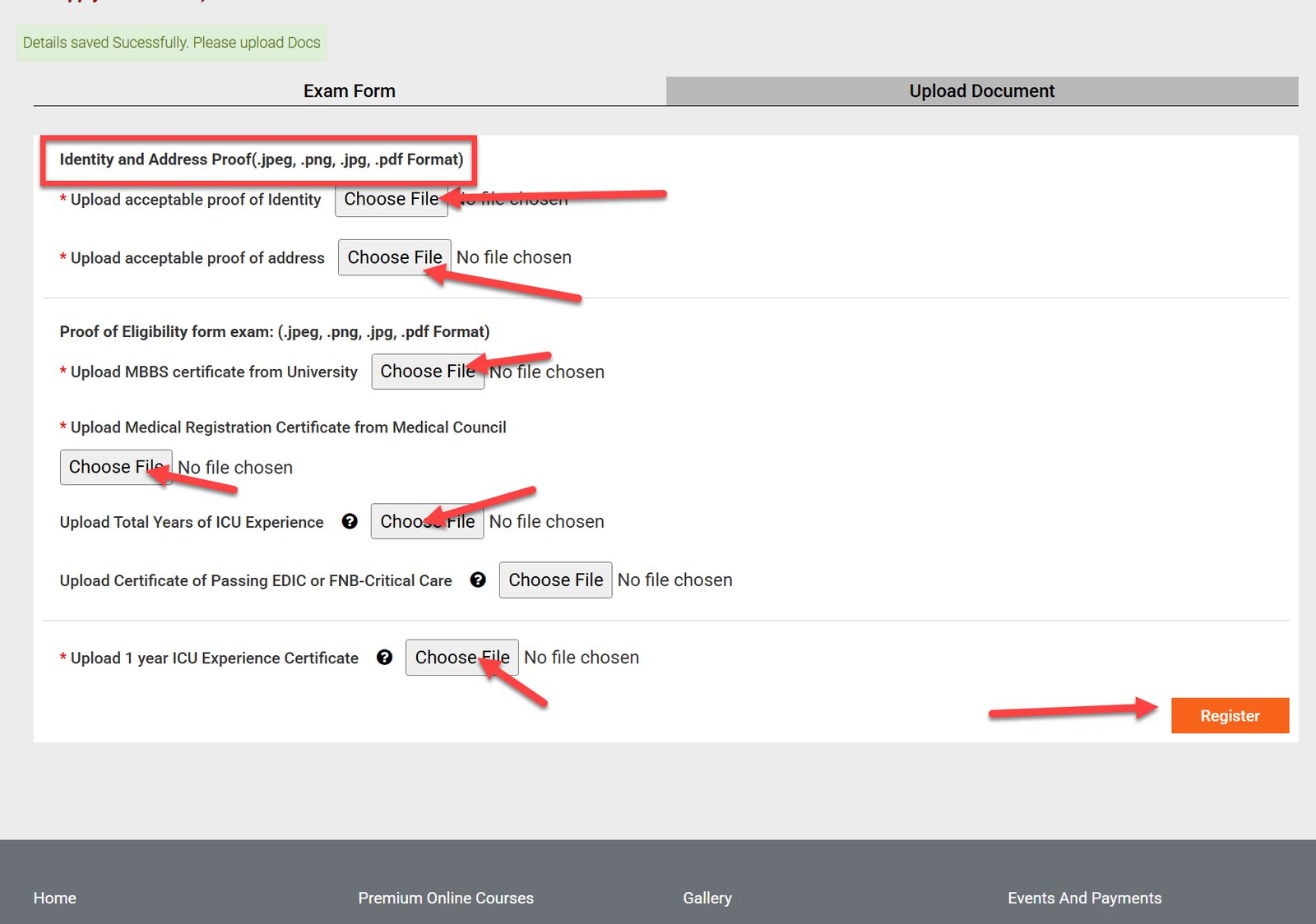
Upload your documents
On the upload page, upload your proof of identity, proof of address and your MBBS certificate from a university. If your MBBS is from outside India, also upload your Indian medical registration certificate.
Upload your medical registration and your ICU experience certificate (from your institute or head of department).
Click “Register”.
Pay the course fee
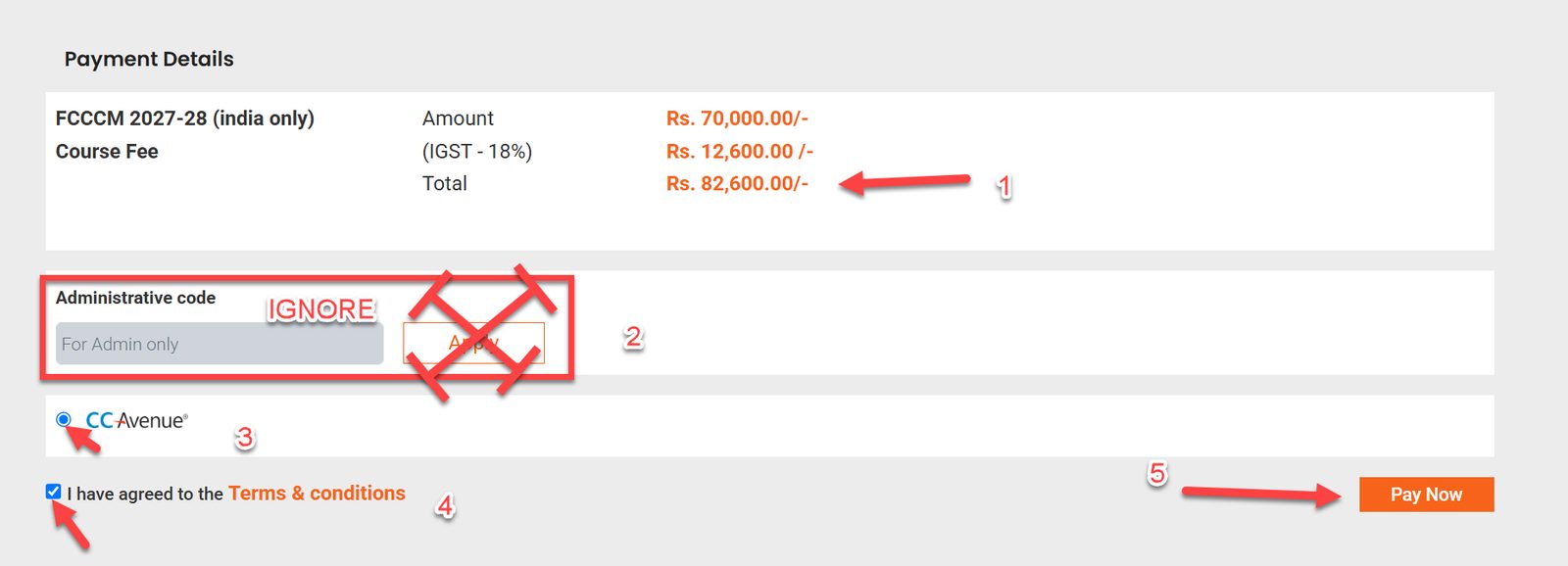
You now reach the payment page, which means everything has been uploaded correctly. You will see the basic fee, GST and the total payable. Ignore the administrative codes, which are for office use only.
Accept the CCAvenue payment gateway and the terms and conditions, then click “Pay Now”. This is similar to your membership payment.
Once payment is successful you are provisionally registered and will receive an email.
The College will then verify your documents, and within 1 to 2 weeks you will receive an acknowledgement that you have been accepted.
Step 12: Congratulations, you are registered
You are now successfully registered for the FCCCM 2-year course. Watch your email over the next 1 to 2 weeks for the College’s acknowledgement.
Please remember that the in-person orientation programmes and the crash course(s) are registered for and paid for separately. Details will be shared with enrolled candidates.
Need help?
Email office@ccef.in with your login username, email ID and mobile number.